
TL;DR —
iptables -Llooks like noise because it flattens two independent axes into one wall of text: where the packet is (the hooks it crosses) and what kind of job you’re doing at that point (the tables). Once you separate those two ideas, the whole system collapses into something you can hold in your head. This post builds that model from first principles and backs every claim with commands you can run yourself in a throwaway container.
Who this is for
Intermediate developers, SREs, and platform/Kubernetes engineers who have typed iptables -L, seen PREROUTING, mangle, nat, and MASQUERADE, and quietly closed the terminal. You should be comfortable with basic TCP/IP (IPs, ports, the idea of a packet). You do not need to know anything about netfilter internals — that’s the whole point.
What you’ll learn
- Why “the stack” and “the tables” are two different things (the core confusion).
- The five netfilter hooks and the three journeys a packet can take.
- What the tables actually do, and why not every table has every chain.
- How a packet walks a chain: first-match-wins, default policy, DROP vs REJECT.
- NAT in one demo — and why conntrack, not the nat table, is the real hero.
- The plot twist: your
iptablesrules are secretly nftables, and how to debug accordingly.
Set up a sandbox (optional, but do it)
Everything below was run live. A Linux container is its own network namespace, so it’s a safe, throwaway firewall lab — flush it, break it, delete it, no risk to your host.
# Linux: run directly. macOS/Windows: use podman/Docker or WSL.podman run -d --name nf-lab --privileged --cap-add=NET_ADMIN \ nicolaka/netshoot sleep infinitypodman exec nf-lab iptables --version# iptables v1.8.11 (nf_tables) <- remember this line; it matters in the last section
The
netshootimage shipsiptables,nft,conntrack,nc, andtcpdump— a complete netfilter workbench. Tear it down at the end withpodman rm -f nf-lab.
The one idea: netfilter ≠ iptables
This single distinction removes most of the confusion:
- netfilter is a framework inside the Linux kernel. It exposes 5 hooks — fixed checkpoints along a packet’s path where kernel code may inspect, modify, or drop it.
- iptables is a userspace command that installs rules at those hooks. The rules live in the kernel;
iptablesjust edits them. Delete the binary and your firewall keeps running.
So there are two axes, and they are independent:
| Axis | What it means | The word people use |
|---|---|---|
| The journey | the path a packet takes through the kernel — a sequence in time | “the stack” |
| The organization | how rules are grouped at each checkpoint — a what-kind-of-job dimension | “tables / chains” |
iptables -L is confusing because it shows you the second axis while staying silent about the first. Let’s fix the first axis, then layer the second on top.
Step 1 — the packet’s journey: 5 hooks + one routing decision
Every packet passes through some subset of five hooks. The routing decision in the middle is the fork in the road: it decides whether a packet is for this host (→ INPUT) or just passing through (→ FORWARD).
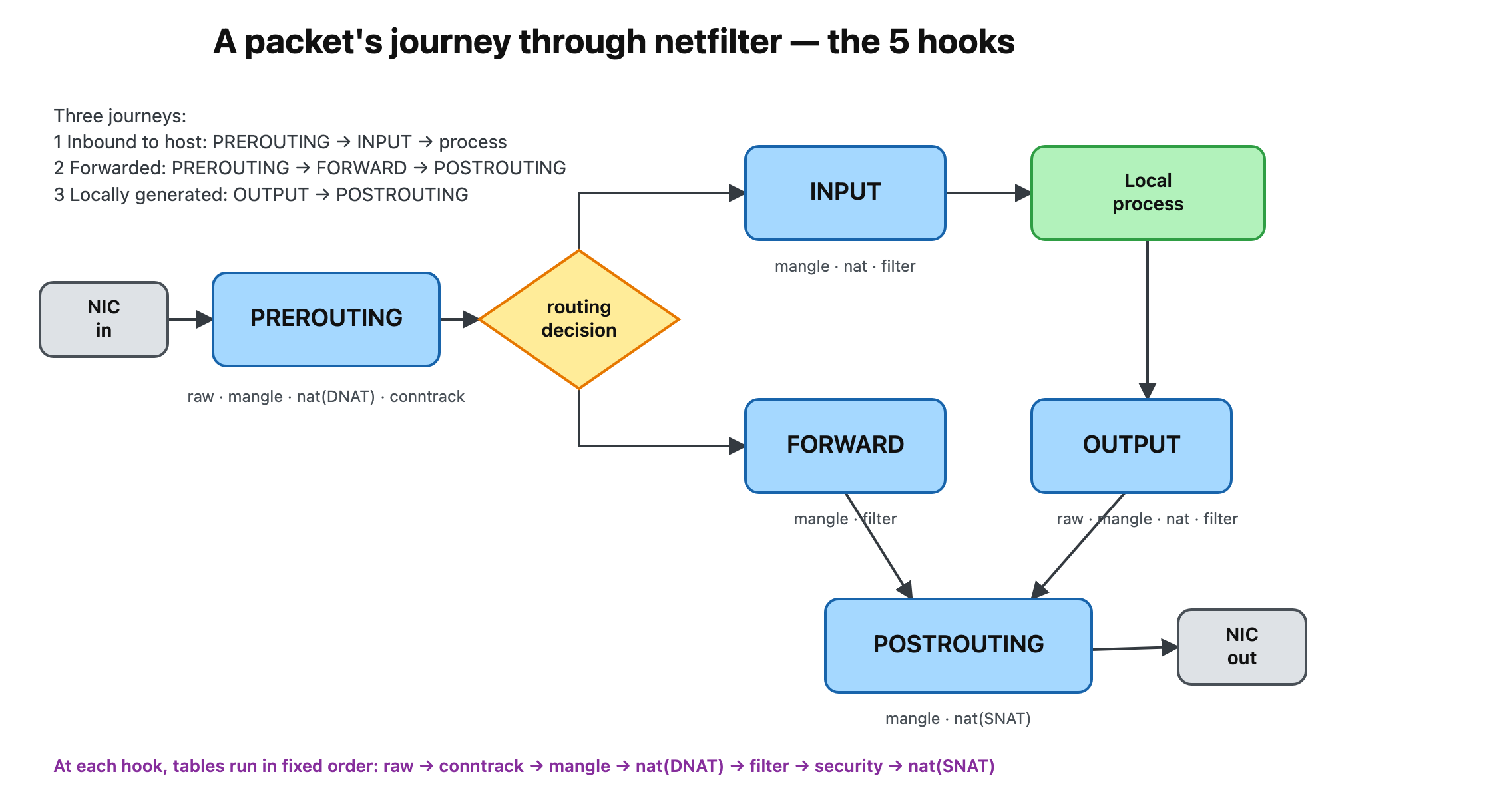
There are exactly three journeys, each just a subset of the five hooks:
- Inbound, for me:
PREROUTING → INPUT → local process - Inbound, routed through me:
PREROUTING → FORWARD → POSTROUTING → out - Locally generated:
OUTPUT → POSTROUTING → out
A chain is simply “the rules attached to one hook, within one table.” That’s why the built-in chains are named after the hooks: INPUT, OUTPUT, FORWARD, PREROUTING, POSTROUTING. Hold onto that — it’s the bridge to the second axis.
ASCII version of the diagram (for RSS / no-JS readers)
            ┌───────────────────┐
  NIC ──►  PREROUTING  ──► [ routing decision ]
            └───────────────────┘        │
                          ┌──────────────┴───────────────┐
                          ▼                               ▼
                    (for THIS host)                 (passing through)
                        INPUT                           FORWARD
                          │                               │
                          ▼                               │
                   local process                          │
                          │                               │
                        OUTPUT                            │
                          │                               │
                          └───────────► POSTROUTING ◄─────┘ ──► NIC
Step 2 — tables: the second axis (what kind of job)
At each hook, rules are grouped into tables by the kind of work they do:
| Table | Job |
|---|---|
| filter | allow / block — ACCEPT / DROP / REJECT (the default table) |
| nat | rewrite addresses — DNAT (inbound), SNAT/MASQUERADE (outbound) |
| mangle | edit headers / set fwmark (TTL, DSCP, policy routing) |
| raw | runs before connection tracking — NOTRACK to exempt a flow |
| security | SELinux/MAC labels (rare) |
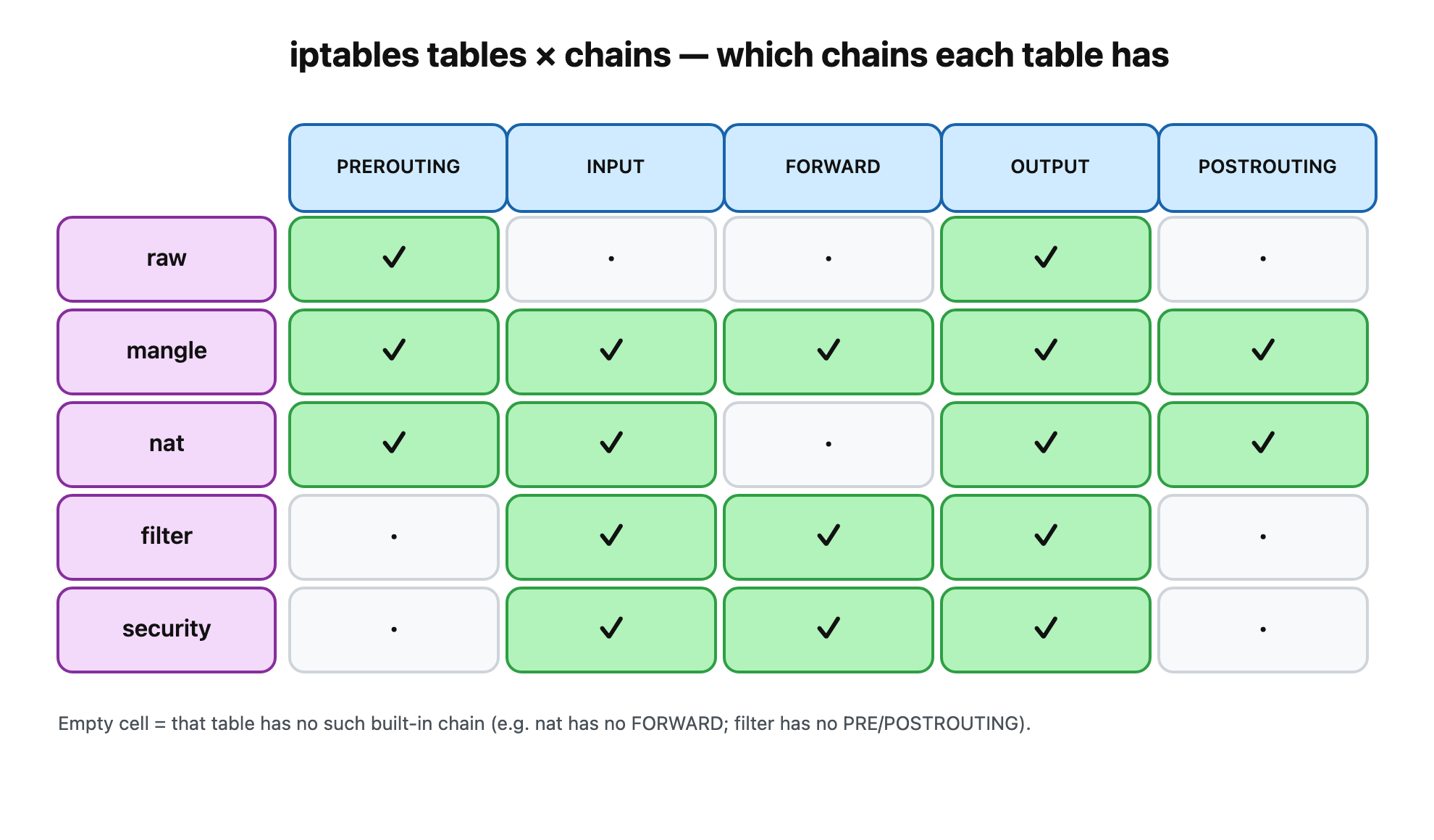
Here’s the part the tutorials gloss over: not every table has every chain. A nat table has no FORWARD; a filter table has no PREROUTING. You can see it directly — list the policy lines (-S shows the chains each table defines):
$ for t in raw mangle nat filter; do echo "--- $t ---"; iptables -t $t -S | grep '^-P'; done--- raw ----P PREROUTING ACCEPT-P OUTPUT ACCEPT--- mangle ----P PREROUTING ACCEPT-P INPUT ACCEPT-P FORWARD ACCEPT-P OUTPUT ACCEPT-P POSTROUTING ACCEPT--- nat ----P PREROUTING ACCEPT-P INPUT ACCEPT-P OUTPUT ACCEPT-P POSTROUTING ACCEPT--- filter ----P INPUT ACCEPT-P FORWARD ACCEPT-P OUTPUT ACCEPT
Drop that into a grid and the second axis becomes obvious. A chain you edit is an intersection of the two axes — nat/PREROUTING means “the NAT rules at the PREROUTING hook”:
ASCII version of the matrix
            PREROUTING  INPUT  FORWARD  OUTPUT  POSTROUTING
 raw            ✓                         ✓
 mangle         ✓        ✓       ✓        ✓         ✓
 nat            ✓        ✓                ✓         ✓
 filter                  ✓       ✓        ✓
 security                ✓       ✓        ✓
One more subtlety: evaluation order at a hook
When multiple tables share a hook, they don’t run in the order you typed — they run in a fixed priority order:
raw → [conntrack] → mangle → nat(DNAT) → filter → security → nat(SNAT)
That ordering explains real behavior: at PREROUTING, DNAT happens before the routing decision and before filter, so your filter rules see the already-translated destination. At POSTROUTING, SNAT is the last thing to touch the packet before it leaves.
Two reflexes worth burning in now:
iptableswith no-tdefaults to-t filter. That’s why “iptables” feels like “the firewall” even though it’s only one of five tables.- The verbose counter columns (
iptables -L -v -n) are your #1 debugging tool: they answer “are packets even reaching this rule?”
Step 3 — rule anatomy, first-match-wins, and the default policy
A rule is a table, an operation, a chain, a set of matches (all ANDed together), and a target:
iptables -t filter -A INPUT -p icmp --icmp-type echo-request -j DROP └─table──┘ └op┘└chain┘ └────────── matches (all ANDed) ─────────┘ └target┘
- op:
-Aappend ·-Iinsert ·-Ddelete ·-Rreplace ·-Fflush ·-Llist ·-Ccheck - matches:
-p,-s/-d,--sport/--dport,-i/-o,-m conntrack --ctstate …, … - target (
-j): terminating (ACCEPT,DROP,REJECT), non-terminating (LOG,MARK), or NAT verdicts (DNAT,SNAT,MASQUERADE,REDIRECT).
The golden rule: within a chain, rules are evaluated top to bottom and the first terminating match wins — the rest of the chain is skipped. Order matters.
Let’s prove counters first. A rule with no -j just counts matching packets and falls through, which makes a clean meter:
$ iptables -A OUTPUT -p icmp # count outbound pings$ iptables -A INPUT -p icmp # count inbound replies$ ping -c 3 8.8.8.8 >/dev/null # generate traffic$ iptables -L -v -nChain INPUT (policy ACCEPT 3 packets, 252 bytes) pkts bytes target prot opt in out source destination 3 252 icmp -- * * 0.0.0.0/0 0.0.0.0/0Chain OUTPUT (policy ACCEPT 3 packets, 252 bytes) pkts bytes target prot opt in out source destination 3 252 icmp -- * * 0.0.0.0/0 0.0.0.0/0
Three pings out, three replies in. Now make a rule actually block something — add a DROP for echo-requests and watch the ping fail:
$ iptables -A INPUT -p icmp --icmp-type echo-request -j DROP$ ping -c 2 -W 1 127.0.0.1PING 127.0.0.1 (127.0.0.1) 56(84) bytes of data.--- 127.0.0.1 ping statistics ---2 packets transmitted, 0 received, 100% packet loss, time 1020ms$ echo $?1
Default policy: every built-in chain ends in a catch-all ACCEPT or DROP. Production firewalls are default-deny: iptables -P INPUT DROP, then explicit ACCEPTs for what you serve.
⚠️ Don’t
-P INPUT DROPover SSH before adding anACCEPTfor your SSH port — you’ll lock yourself out of the box instantly. Add the allow rule first, test, then tighten the policy.
DROP vs REJECT: DROP silently blackholes the packet (the sender waits and times out — “stealth”); REJECT sends back an ICMP/RST error immediately (faster failure, but advertises that something is filtering).
The stateful pattern you’ll use everywhere:
iptables -A INPUT -m conntrack --ctstate ESTABLISHED,RELATED -j ACCEPT
“Allow replies to connections we started” — then you only need to open NEW inbound on the specific ports you serve. Which brings us to the table everyone fears.
Step 4 — NAT in one demo (and conntrack is the real hero)
NAT just means rewriting addresses. Two directions:
| Rewrites | Hook | Used for | |
|---|---|---|---|
| DNAT | destination | PREROUTING (in/forward) or OUTPUT (local) | port-forward, REDIRECT, k8s ClusterIP → pod |
| SNAT / MASQUERADE | source | POSTROUTING | one-IP sharing, k8s / Docker egress |
Here’s a self-contained REDIRECT (a special DNAT to a local port). We send traffic to :8080, but a listener on :9000 answers it:
$ iptables -t nat -A OUTPUT -p tcp --dport 8080 -j REDIRECT --to-ports 9000$ ( echo "hello-from-9000" | nc -l -p 9000 ) & # listener on :9000$ echo ping | nc -w1 127.0.0.1 8080 # client dials :8080hello-from-9000 # ...answered by :9000
The magic is in the conntrack tuple. One connection is tracked as two tuples — the original direction and the reply direction — and the reply shows the rewrite:
$ conntrack -L -p tcptcp 6 119 TIME_WAIT \ src=127.0.0.1 dst=127.0.0.1 sport=42070 dport=8080 \ # ORIGINAL: what the client sent src=127.0.0.1 dst=127.0.0.1 sport=9000 dport=42070 \ # REPLY: note sport=9000 (rewritten!) [ASSURED] mark=0 use=1
This is the key insight most NAT explanations bury:
Only the first packet of a flow actually hits the nat table. conntrack records the translation, then rewrites every subsequent packet — and un-NATs the return traffic automatically — without re-consulting your rules. The nat table makes the decision; conntrack does the work.
Where you’ve already been using this without knowing:
- Home router: a single
MASQUERADErule inPOSTROUTINGshares one public IP across your whole house. - Docker: the bridge network is
MASQUERADEfor egress plusDNATfor every-ppublished port. - Kubernetes: kube-proxy in iptables mode is walls of
DNATrules innat/PREROUTINGandnat/OUTPUTturning ClusterIPs into pod IPs.
A one-line mnemonic: filter decides if a packet lives; nat decides where it goes and who it’s from — first packet only; conntrack remembers the rest.
Step 5 — the plot twist: your iptables rules are nftables
Remember iptables v1.8.11 (nf_tables) from the setup step? On every modern distro, the iptables command is a compatibility front-end that translates your rules into nftables, the kernel’s current packet-classification engine. Same rule, two views:
$ iptables -A INPUT -p tcp --dport 22 -j ACCEPT # add it the "iptables" way$ nft list ruleset # ...read it the "nftables" waytable ip filter { chain INPUT { type filter hook input priority filter; policy accept; tcp dport 22 counter packets 0 bytes 0 accept }}$ readlink -f $(which iptables)/usr/sbin/xtables-nft-multi
Look at that nft chain header: type filter hook input priority filter. It spells out both axes explicitly — table = what kind of job, hook = when in the journey, priority = the fixed evaluation order from Step 2. Those priority names map to fixed numbers (raw = -300, mangle = -150, dstnat = -100, filter = 0, srcnat = 100) and the lower the number, the earlier it runs. Everything in this post is sitting right there in one line.
⚠️ The legacy/nft split-brain. Rules added with
iptables-legacylive in a different place thaniptables-nftrules, and each is blind to the other. On a mystery host, this is a classic “my rule is clearly there but has no effect” trap. Check both front-ends, and treatnft list rulesetas the ground truth.
Debugging toolkit
| Command | Use |
|---|---|
iptables -L -v -n --line-numbers | counters; pkts=0 ⇒ traffic isn’t reaching the rule; -Z resets |
iptables -C <rule…> | does this exact rule exist? (exit 0/1 — great in scripts) |
iptables -S | dump rules as re-create commands (diff-friendly) |
iptables-save / iptables-restore | back up / atomically reload all tables |
-j LOG --log-prefix "..." then dmesg | log packets that match a rule |
-t raw -j TRACE then dmesg | follow one packet through every table and chain |
conntrack -L | inspect live NAT / connection state |
nft list ruleset | the real, unified view of everything |
One silent footgun: interface matches only work on hooks where that interface is known. -i (in-interface) is valid only in PREROUTING/INPUT/FORWARD; -o (out-interface) only in FORWARD/OUTPUT/POSTROUTING. Use the wrong one and the rule never matches — with no error.
Recap
- netfilter ≠ iptables. The kernel has the hooks; iptables just edits rules at them.
- Two axes. The journey (5 hooks, split by one routing decision) and the tables (what kind of job). A chain is their intersection.
- First-match-wins, then a default policy catch-all. Lead with the stateful
ESTABLISHED,RELATEDaccept. - conntrack is the hero of NAT — the nat table only touches the first packet.
- It’s all nftables underneath.
table/hook/priorityis the mental model, made literal.
Cheat sheet
# Spin up a throwaway labpodman run -d --name nf-lab --privileged --cap-add=NET_ADMIN nicolaka/netshoot sleep infinitypodman exec -it nf-lab bash# Look aroundiptables -L -v -n --line-numbers # filter table + countersfor t in raw mangle nat filter; do iptables -t $t -S | grep '^-P'; done # chains per table# Allow/block (filter)iptables -A INPUT -m conntrack --ctstate ESTABLISHED,RELATED -j ACCEPTiptables -A INPUT -p tcp --dport 22 -j ACCEPTiptables -P INPUT DROP # default-deny — add the SSH ACCEPT FIRST# NAT + stateiptables -t nat -A OUTPUT -p tcp --dport 8080 -j REDIRECT --to-ports 9000conntrack -L# Ground truth + backupnft list rulesetiptables-save > rules.v4# Teardownpodman rm -f nf-lab
Further reading
man iptables,man iptables-extensions,man conntrack- The nftables wiki — especially the legacy-vs-nft notes
- The canonical netfilter packet-flow diagram (Wikipedia) — keep it open the first few times
iptables-translate <rule>— paste any iptables rule, get the nftables equivalent
Spin up the container, run every block above, break things, and delete it. The model sticks when the counters move in front of you.


