Why Kubernetes Multi-Cluster Still Has No Winner

💡 TL;DR: “Multi-cluster” is not one problem. It is a bundle of loosely related problems (placement, lifecycle, networking, traffic, policy, identity, observability, data) that pull in different directions. That is why there is no single standard or winner, and why the best setups compose focused tools per dimension instead of chasing one platform to rule them all.

Kubernetes won because it gave the industry a strong single-cluster abstraction. You describe workloads, services, config, and desired state, and the control plane continuously works toward that state inside one cluster.

Multi-cluster never got the same clean abstraction. Not because people have not tried, and not because the tooling is immature in some simple linear way. The more uncomfortable answer is that “multi-cluster” is not one problem. It is a label we put on many different problems that happen to involve more than one cluster.

That distinction matters. If two teams say they need multi-cluster, they may mean completely different things. One team wants safer cluster upgrades. Another wants to deploy the same app to every region. Another wants failover during regional outages. Another wants service-to-service traffic across clusters. Another wants policy enforcement across a fleet. Another wants a global scheduler. Another wants disaster recovery for stateful systems.

Those are related, but they are not the same problem.

🧩 Multi-cluster is many dimensions, not one dimension

When people talk about multi-cluster, they usually mean some combination of these dimensions:

  • Fleet inventory and cluster lifecycle: create, upgrade, patch, rotate, scale, and delete clusters.
  • Workload and config distribution: roll out apps, manifests, policies, and platform components across many clusters.
  • Workload placement: decide which cluster should run a workload based on capacity, cost, latency, compliance, availability, or business intent.
  • Networking and service discovery: allow services in one cluster to find and call services in another cluster.
  • Traffic management: route users to the right region or fail over when a cluster or region is unhealthy.
  • Policy, identity, and security: enforce consistent rules without flattening trust boundaries.
  • Observability: understand a fleet as one system while still preserving per-cluster ownership and debugging context.
  • Stateful data and disaster recovery: keep data available, replicated, recoverable, and consistent enough for the application.

The problem is that each dimension has different owners, different failure modes, and different definitions of success.

Cluster lifecycle is usually a platform engineering problem. Workload rollout may belong to app teams or platform teams depending on the organization. Global traffic often belongs to networking, edge, or SRE teams. Identity and policy involve security teams. Stateful failover is usually an application and data-platform problem before it is a Kubernetes problem.

Trying to solve all of that with one “multi-cluster platform” is where the abstraction starts to crack.

🧱 The cluster boundary is not an accident

A Kubernetes cluster is not just a scheduling bucket. It is also a failure boundary, trust boundary, quota boundary, upgrade boundary, API boundary, and often an ownership boundary.

That is why multi-cluster exists in the first place. Organizations use multiple clusters to reduce blast radius, isolate tenants, separate environments, place workloads near users, satisfy data residency rules, or avoid coupling every workload to one giant control plane.

But many multi-cluster systems are tempted to make many clusters look like one big cluster. That sounds attractive until you look closely.

If many clusters behave like one cluster, what happens during a network partition? What if one cluster is two Kubernetes versions behind? What if a policy is valid in one region but illegal in another? What if capacity exists in a cluster, but the data needed by the workload does not? What if traffic fails over cleanly but the downstream dependency does not? What if the global control plane is healthy, but one member cluster is slowly failing?

These are not edge cases. They are the normal operating conditions of distributed systems.

This is the core reason there is no obvious winner. A universal abstraction has to hide complexity, but multi-cluster correctness often requires exposing complexity. The operator needs to know which cluster is broken, which boundary is being crossed, which policy applies, which data is stale, and which failure mode is acceptable.

🧰 The status quo is a toolbox, not a single platform

In practice, successful multi-cluster setups tend to be composed from narrower tools.

GitOps is commonly used for workload and configuration distribution. It is not a complete multi-cluster solution, but it is a good answer for “make these desired states show up consistently across these clusters.”

Cluster lifecycle tools, including cloud provider fleet managers and Cluster API-style approaches, focus on creating, upgrading, and operating clusters. They solve a platform operations problem, not global application scheduling.

Gateway, ingress, DNS, CDN, and global load-balancing systems often handle user-facing traffic. They are usually the right layer for north-south failover and traffic steering because the user enters the system from outside the cluster anyway.

A service mesh is usually the stronger answer for cross-cluster service-to-service traffic. It gives you workload identity, mutual TLS, service discovery, and traffic policy as a consistent layer instead of a pile of per-app glue. The historical objection was cost: the sidecar-per-pod model added latency, memory, and upgrade pain that made many teams shy away. Ambient mode changes that calculus. By moving mTLS and L4 identity into a shared per-node layer and making the L7 proxy optional and only-when-needed, it removes the sidecar tax and makes a secure cross-cluster mesh far cheaper to run at scale. That is what turns “mesh across clusters” from a heavy commitment into a reasonable default.

Kubernetes-native Multi-Cluster Services exists in the same space, but it is a narrower primitive. It handles scoped service discovery and can stitch a service across clusters, yet it stops short of identity, encryption, and traffic policy, so you usually end up bolting a mesh on top anyway. In practice it is a supporting detail, not the foundation you build cross-cluster connectivity on.

Policy engines help enforce governance across fleets. Observability systems centralize metrics, logs, traces, and events so teams can see fleet-wide patterns without pretending every cluster is the same.

None of these categories is fake. They are all useful. But each solves a slice. Calling any one of them “the multi-cluster solution” is usually marketing shorthand.

⚠️ Where current approaches still fall short

The weakest area is probably workload placement. People want to say, “run this workload in the best cluster,” but “best” depends on real-time capacity, cost, latency, compliance, affinity, data location, failure domains, upgrade windows, and business priority. That is a lot of intent to encode, and most organizations do not have clean enough signals to automate it safely.

Cross-cluster networking is another trap. It is easy to draw a diagram where services talk across clusters. It is much harder to operate that path during certificate rotation, DNS drift, asymmetric latency, packet loss, policy mismatch, partial outage, and incident response. Every cross-cluster dependency can turn a local failure into a distributed failure.

Stateful workloads remain the hardest part. Kubernetes can restart pods. It cannot magically decide your data consistency model. Multi-region databases, replication lag, backup restore, failover ordering, and application-level reconciliation usually matter more than the Kubernetes object that launched the pod.

Ownership is also unresolved. Platform teams want standardized control. App teams want autonomy. Security teams want enforceable policy. SRE teams want debuggability. A multi-cluster system that hides too much makes incidents harder. A system that exposes everything becomes too complicated for most teams to use.

That tension is not going away.

🏗️ The future is layered, not monolithic

The future of Kubernetes multi-cluster is probably not one grand control plane that makes every cluster disappear behind a single API. It is a set of layered standards with honest interfaces between them, where each layer owns one dimension, preserves the cluster boundary, and exposes a clear contract to the next.

A workable model looks like this:

  • Use fleet tooling for cluster lifecycle: create, upgrade, patch, rotate, and retire clusters.
  • Use GitOps or desired-state distribution for apps and platform config.
  • Use Gateway, DNS, CDN, or global load balancing for user-facing traffic.
  • Use a service mesh for explicit east-west service calls, identity, and mTLS, and prefer ambient mode so the security layer does not cost you a sidecar per pod.
  • Use policy and identity systems to enforce rules consistently without flattening trust.
  • Use centralized observability to see the fleet while preserving per-cluster debugging context.
  • Treat stateful failover as a data-platform and application problem, not a scheduler problem.

Several of these layers are already maturing. Gateway API is standardizing more of the traffic story, service mesh is becoming the default way to carry identity and encrypted service-to-service traffic across clusters (ambient mode in particular is removing the sidecar overhead that used to make people hesitate), and GitOps has become the default distribution mechanism because it fits the shape of the problem: versioned desired state applied independently to many targets. None of them tries to be the whole answer, and that is exactly why they work.

The point is not one API that hides every cluster. It is the contracts between layers: how workloads are distributed, how traffic moves, how identity is trusted, how policy is enforced, how failures are isolated, and who owns each decision.

Automation and AI may help here, especially for operations: summarizing fleet health, detecting unsafe rollout patterns, recommending placement, or correlating incidents across clusters. But automation only helps when intent and safety boundaries are explicit. If the system does not know whether latency, cost, compliance, or availability matters most, it cannot make a good placement decision. It can only make a confident-looking guess.

🧭 The practical advice

So stop treating multi-cluster as one product category, and start by naming the dimension you are actually solving. Consistent deployment, safer upgrades, regional failover, cross-cluster service calls, and disaster recovery are different problems with different owners, and the layered model above already tells you where each one lives. Pick the tool for that layer instead of shopping for a platform that claims all of them.

Multi-cluster is real. The need is real. But the phrase is too broad to produce one clean winner. The winning approach is not to make many clusters pretend to be one cluster. It is to manage many clusters while being honest about why they are separate, which boundaries should stay intact, and which cross-cluster problems actually need to be solved.
Why Kubernetes Multi-Cluster Still Has No Winner

ztunnel, unmasked: the ambient mesh myths, busted on a live cluster

TL;DR – ztunnel is not a sidecar, and it is not a host router. It is one proxy per node that reaches a “long straw” into each pod’s network namespace and acts as that pod: same IP, same identity. Almost every ztunnel misconception comes from picturing it in the wrong place. This post fixes the mental model and disproves five common myths with output from a live ambient cluster you can rebuild in five minutes.

Who this is for

Platform, networking, and SRE folks who have heard that Istio’s ambient mode “removes the sidecar,” maybe enabled it, and now have a fuzzy picture of what ztunnel actually is and where it runs. You should know basic Kubernetes networking (pods, namespaces, a pod IP vs a node IP) and be comfortable reading ss and tcpdump output. You do not need to know Istio internals: that is the point.

What you’ll learn

  • The one mental model that makes ztunnel click: the “long straw” node proxy.
  • Where ztunnel’s sockets really live (hint: not the host).
  • What the HBONE connection looks like from inside the pod netns, and what the app on the other end sees.
  • Why the “tunnel” in ztunnel is a proxied mTLS stream, not a VXLAN/Geneve-style network tunnel.
  • Why this ztunnel data path does not carry non-DNS UDP over HBONE, and what that means for NetworkPolicy.

Every claim below is backed by output from a real cluster. Version matters here: this is Istio 1.30 with the in-pod redirection dataplane, which is the default for recent ambient. Older designs behaved differently, and I call those out where it matters.

Set up a sandbox (optional, but do it)

A kind cluster is a throwaway ambient lab. Build it, break it, delete it, no risk to anything.

# 3 nodes so we can show real cross-node traffic
kind create cluster --name ztunnel-lab --config - <<'EOF'
kind: Cluster
apiVersion: kind.x-k8s.io/v1alpha4
nodes: [ {role: control-plane}, {role: worker}, {role: worker} ]
EOF

# Install ambient (istiod + istio-cni + ztunnel), no sidecars
istioctl install --set profile=ambient -y

# A client and a server, pinned to different nodes, enrolled in the mesh
kubectl create ns demo
kubectl label ns demo istio.io/dataplane-mode=ambient
# (client = netshoot on worker, server = go-httpbin on worker2; pin them however you like)

Two workloads, one on each worker, both showing up as HBONE:

$ istioctl ztunnel-config workloads
NAMESPACE  POD NAME    ADDRESS     NODE                 PROTOCOL
demo       client-...  10.244.1.5  ztunnel-lab-worker   HBONE
demo       server-...  10.244.2.5  ztunnel-lab-worker2  HBONE

The one trick you need for the proofs below: get inside a pod’s network namespace. A kind node is just a container, so hop onto the node, find the pod’s process, and nsenter its netns:

NODE=ztunnel-lab-worker
cid=$(docker exec $NODE crictl ps --name netshoot -q | head -1)
pid=$(docker exec $NODE crictl inspect --output go-template --template '{{.info.pid}}' $cid)
docker exec $NODE nsenter -t $pid -n ss -lntp     # sockets as the pod sees them

Keep that nsenter -t $pid -n ... pattern handy. Most of the “aha” moments live in there.


The one idea: the long straw

The sidecar model was simple to picture: a dedicated Envoy inside every pod, sharing that pod’s network namespace, intercepting its traffic locally. One helper per room.

Ambient deletes that helper. So people reach for the next-simplest picture, “there must be one big proxy on the host doing it for everyone,” and that picture is what breaks. The reality is in between:

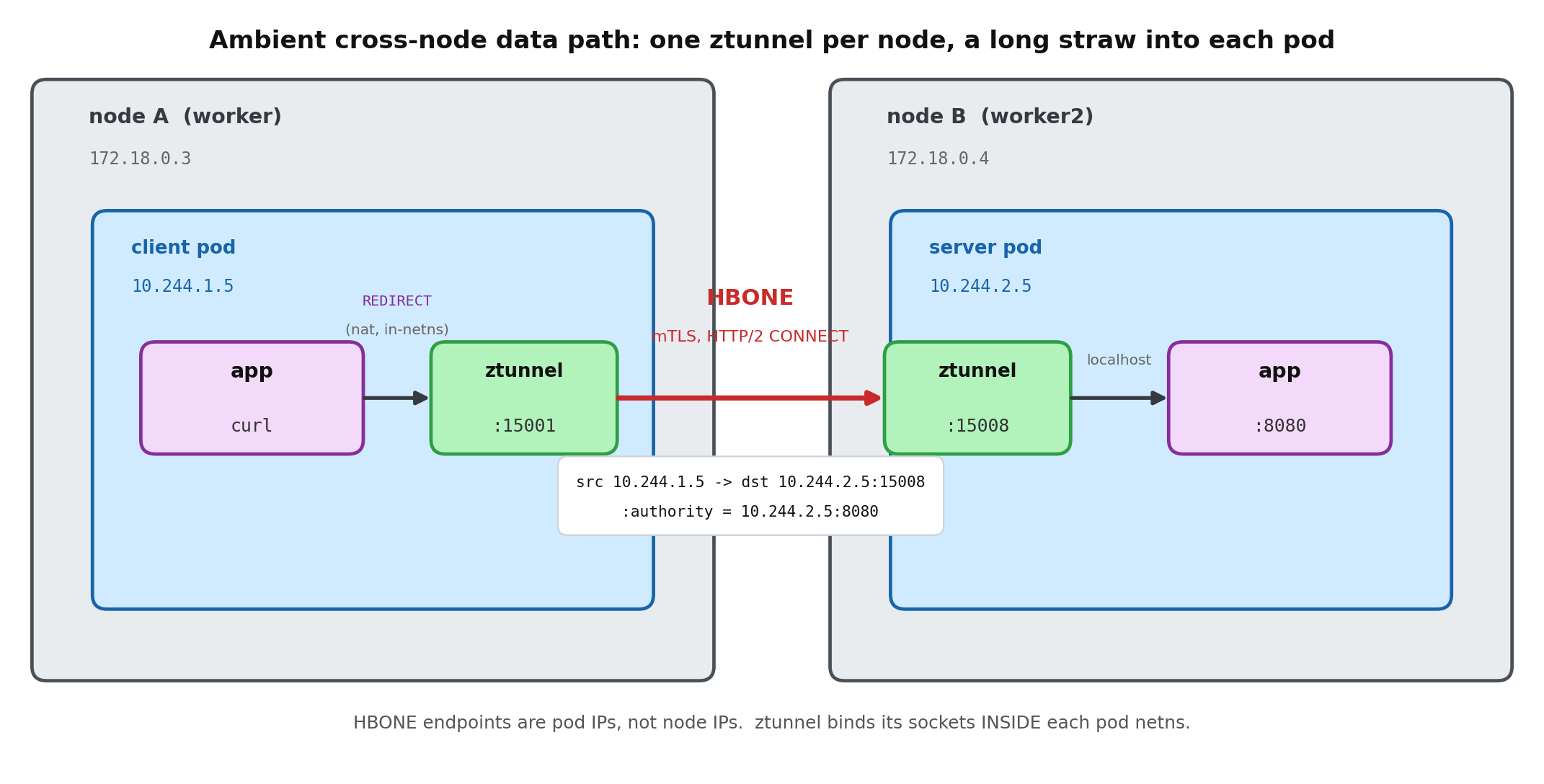
Ambient runs one ztunnel per node, but that ztunnel extends a separate “long straw” into each local pod’s network namespace (via setns) and operates from inside the pod. Because it is standing in the room, it wears the room’s badge: it sends with the pod’s own IP and presents the pod’s SPIFFE identity. For the pod-to-pod path below, the remote end sees the pod, not the ztunnel pod and not the Kubernetes node.

Hold that image. Myths 1 through 3 are all just people forgetting that the straw reaches all the way into the room.

Myth 1: “ztunnel runs in the host network namespace”

This is the most common one, and it is wrong twice over.

First, ztunnel is an ordinary pod with its own IP, not a host-networked process:

$ kubectl -n istio-system get pod -l app=ztunnel -o wide
NAME            READY   IP           NODE                 ...
ztunnel-d6dp7   1/1     10.244.1.4   ztunnel-lab-worker   ...
# hostNetwork is false; podIP 10.244.1.4 != nodeIP 172.18.0.3

Second, and this is the part people miss: look at who owns the capture sockets inside the app pod’s namespace. We nsenter into the client pod (IP 10.244.1.5) and list its listeners:

$ nsenter -t <client-pid> -n ss -lntp
LISTEN 0 128 *:15008  users:(("ztunnel",pid=1029,fd=29))
LISTEN 0 128 *:15001  users:(("ztunnel",pid=1029,fd=31))
LISTEN 0 128 *:15006  users:(("ztunnel",pid=1029,fd=30))
LISTEN 0 128 127.0.0.1:15053 users:(("ztunnel",pid=1029,...))

Those sockets are in the app’s netns, but they belong to the ztunnel process (pid 1029), which lives in the ztunnel pod on the node. That is the long straw: one ztunnel, one logical proxy task per pod, sockets bound from inside each pod’s namespace. It needs CAP_SYS_ADMIN to do it:

$ capsh --decode=$(awk '/CapEff/{print $2}' /proc/1029/status)
cap_net_admin, cap_net_raw, cap_sys_admin   # sys_admin = the setns() capability

The “host netns” picture is a memory of the earlier ambient Geneve design, which really did run in the host namespace and stitched pods in with Geneve tunnels (istioin/istioout) and routing tables 100/101. The in-pod redirection model retired all of that.

Myth 2: “HBONE dials the node IP”

If ztunnel were on the host, node-to-node tunnels would make sense. It is not, so they do not exist. Run tcpdump inside the client pod’s netns while it curls the server:

$ nsenter -t <client-pid> -n tcpdump -ni eth0 'tcp port 15008'
IP 10.244.1.5.44224 > 10.244.2.5.15008: Flags [P.], length 39
IP 10.244.2.5.15008 > 10.244.1.5.44224: Flags [P.], length 56

The HBONE connection that ztunnel opens is pod IP to pod IP, on port 15008. The node IPs (172.18.0.x) are not the HBONE source or destination in this capture. Your CNI might still do its own lower-layer routing or encapsulation below the pod network namespace; the ztunnel point is that HBONE itself is not dialing a node IP. There is no source spoofing to explain either: ztunnel’s outbound socket is in the client’s netns, so packets naturally leave with the pod’s own address. The straw wears the room’s badge.

And the server app agrees. go-httpbin echoes the peer address it sees:

$ curl -s http://server:8080/get | grep origin
"origin": "10.244.1.5:38835"     # the CLIENT pod IP, end to end

Myth 3: “it’s one big host-to-host tunnel that all pods share”

Even once people accept pod-to-pod, they often imagine a single shared pipe per node pair. It is the opposite: tunnels are keyed by workload identity, and the application port is not part of the key at all. One ztunnel access-log line shows the whole structure:

src.addr=10.244.1.5:54430  src.identity="spiffe://cluster.local/ns/demo/sa/default"
dst.addr=10.244.2.5:15008  dst.hbone_addr=10.244.2.5:8080
dst.service="server.demo.svc.cluster.local"  direction="outbound"

Read that carefully. The L3 destination is the peer pod at :15008. The real target the app asked for, :8080, rides inside the tunnel as dst.hbone_addr (it becomes the HTTP/2 CONNECT authority). So a single identity-scoped connection between two workloads can carry multiple app ports and application connections as separate HTTP/2 streams. The tcpdump in Myth 2 showed this: four back-to-back curls all reused one outer connection (10.244.1.5:44224 to 10.244.2.5:15008). Think of the pool key as {src identity, dst identity, src pod IP, dst pod IP:15008}, never the app port.

Myth 4: “ztunnel is a network tunnel protocol, like VXLAN”

The name misleads. The “z” is for zero-trust, and the “tunnel” is a proxied, mutually authenticated TCP stream, not a kernel/network-overlay protocol like VXLAN, Geneve, or IPsec. ztunnel creates no ztunnel-owned overlay device. In this lab pod, the only interfaces are loopback and a plain veth, and there is no ztunnel istioin/istioout, vxlan, or geneve device in the pod netns:

$ nsenter -t <client-pid> -n ip -br link
lo          UNKNOWN  ...
eth0@if15   UP       ...                      # a veth, not a tunnel device

$ ip -o link show type vxlan; ip -o link show type geneve   # pod netns
# (nothing)

If your CNI uses VXLAN or Geneve, that is the CNI’s underlay/overlay choice, not a ztunnel device. HBONE is still a tunnel in the HTTP CONNECT sense: application TCP byte streams are carried inside an mTLS HTTP/2 connection. What it is not is packet-level L3 overlay tunneling: ztunnel does not add an outer IP header or create a VXLAN/Geneve device. The earlier ambient design that did use Linux tunnel devices, with Geneve istioin/istioout, is exactly the one that was retired.

Myth 5: “HBONE can tunnel anything, including UDP”

For the Istio 1.30 ztunnel path tested here, HBONE is HTTP/2 CONNECT carrying TCP streams. It does not carry non-DNS UDP application traffic. The proof is in the listener types inside the pod netns:

$ nsenter -t <client-pid> -n ss -lnt | awk '{print $4}'   # TCP
*:15008   *:15001   *:15006   127.0.0.1:15053
$ nsenter -t <client-pid> -n ss -lnu | awk '{print $4}'   # UDP
127.0.0.1:15053                                           # DNS only

The mesh ports (15008/15001/15006) are TCP. The only UDP ztunnel touches here is 15053, and only for DNS resolution, not HBONE tunneling. Non-DNS UDP from your app is not captured by ztunnel in this path: it rides your CNI as plaintext. Two practical consequences: UDP application traffic is not mTLS-protected by this ambient datapath today, and any NetworkPolicy you write must allow TCP 15008 or ambient breaks.


Cross-node ambient data path: the client app's connection is redirected in-netns to the local ztunnel on port 15001; ztunnel opens one identity-scoped HBONE (mTLS, HTTP/2 CONNECT) connection from the client pod IP to the server pod IP on port 15008; the server-side ztunnel, inside the server pod netns, terminates it and forwards to the app on localhost:8080. Node IPs are not the HBONE endpoints.

ASCII version of the data path (for RSS / no-JS readers)
   node A (worker)                                   node B (worker2)
 ┌───────────────────────────┐               ┌───────────────────────────┐
 │  client pod netns          │               │  server pod netns          │
 │  10.244.1.5                │               │  10.244.2.5                │
 │                            │               │                            │
 │  app --curl server:8080    │               │        app :8080           │
 │    │ REDIRECT (nat)        │               │           ▲ localhost      │
 │    ▼                       │               │           │                │
 │  ztunnel :15001 ───────────┼── HBONE ──────┼─► ztunnel :15008           │
 │  (long straw into pod)     │  mTLS, H2      │  (long straw into pod)     │
 │                            │  CONNECT       │                            │
 └───────────────────────────┘  :authority =  └───────────────────────────┘
   src = 10.244.1.5            10.244.2.5:8080   dst = 10.244.2.5:15008
                    (node IPs 172.18.0.x are not HBONE endpoints)

Recap

  • One node proxy, many straws. ztunnel is one pod per node that setns into each local pod and binds its capture sockets there. Not a sidecar, not a host router.
  • Pod identity end to end. In the pod-netns capture, the HBONE endpoints are pod IP to pod IP on 15008; the server app sees the client pod IP; both ends are pinned to SPIFFE identities.
  • Identity-scoped tunnels, multiplexed. The app port is not in the pool key: it rides inside the tunnel as the CONNECT authority for each application connection.
  • A proxy, not a network overlay. HBONE carries TCP streams inside HTTP/2 + mTLS; ztunnel adds no ztunnel-owned VXLAN/Geneve device.
  • TCP streams only in this path. Non-DNS UDP is not carried over HBONE here, so plan for UDP separately and allow TCP 15008 in any NetworkPolicy.

The through-line: ztunnel is a per-pod-scoped, identity-pinned, userspace TCP proxy. The kernel only steers packets to it; ztunnel does not become the pod’s address, and it does not install a VXLAN/Geneve-style network overlay.

Cheat sheet

Port Role
15001 outbound capture (app egress redirected here)
15006 inbound plaintext capture
15008 inbound HBONE (mTLS, HTTP/2 CONNECT)
15053 DNS (TCP + UDP, localhost)
15021 / 15020 / 15000 readiness / metrics / admin
# The three commands that answer most "what is ztunnel doing" questions:
istioctl ztunnel-config workloads          # who is enrolled, and as what
nsenter -t <pod-pid> -n ss -lntp           # ztunnel's sockets, inside the pod netns
kubectl -n istio-system logs <ztunnel> | grep access   # src/dst identity + hbone_addr

Further reading

  • Istio ambient docs, especially the ztunnel and traffic-redirection pages
  • The HBONE and ztunnel design notes in the istio/ztunnel repository
  • RFC 9110 (the HTTP CONNECT method), which HBONE uses to open a TCP tunnel; UDP proxying would be the separate CONNECT-UDP mechanism of RFC 9298, which this ztunnel app-traffic path does not use

Rebuild the cluster, rerun every block above, and watch the HBONE endpoints show up as pod IPs, not node IPs, from inside the pod netns. The model sticks once you have nsenter-ed into a pod and seen ztunnel’s sockets sitting inside it.

ztunnel, unmasked: the ambient mesh myths, busted on a live cluster