
TL;DR – ztunnel is not a sidecar, and it is not a host router. It is one proxy per node that reaches a “long straw” into each pod’s network namespace and acts as that pod: same IP, same identity. Almost every ztunnel misconception comes from picturing it in the wrong place. This post fixes the mental model and disproves five common myths with output from a live ambient cluster you can rebuild in five minutes.
Who this is for
Platform, networking, and SRE folks who have heard that Istio’s ambient mode “removes the sidecar,” maybe enabled it, and now have a fuzzy picture of what ztunnel actually is and where it runs. You should know basic Kubernetes networking (pods, namespaces, a pod IP vs a node IP) and be comfortable reading ss and tcpdump output. You do not need to know Istio internals: that is the point.
What you’ll learn
- The one mental model that makes ztunnel click: the “long straw” node proxy.
- Where ztunnel’s sockets really live (hint: not the host).
- What the HBONE connection looks like from inside the pod netns, and what the app on the other end sees.
- Why the “tunnel” in ztunnel is a proxied mTLS stream, not a VXLAN/Geneve-style network tunnel.
- Why this ztunnel data path does not carry non-DNS UDP over HBONE, and what that means for
NetworkPolicy.
Every claim below is backed by output from a real cluster. Version matters here: this is Istio 1.30 with the in-pod redirection dataplane, which is the default for recent ambient. Older designs behaved differently, and I call those out where it matters.
Set up a sandbox (optional, but do it)
A kind cluster is a throwaway ambient lab. Build it, break it, delete it, no risk to anything.
# 3 nodes so we can show real cross-node traffic
kind create cluster --name ztunnel-lab --config - <<'EOF'
kind: Cluster
apiVersion: kind.x-k8s.io/v1alpha4
nodes: [ {role: control-plane}, {role: worker}, {role: worker} ]
EOF

# Install ambient (istiod + istio-cni + ztunnel), no sidecars
istioctl install --set profile=ambient -y

# A client and a server, pinned to different nodes, enrolled in the mesh
kubectl create ns demo
kubectl label ns demo istio.io/dataplane-mode=ambient
# (client = netshoot on worker, server = go-httpbin on worker2; pin them however you like)
Two workloads, one on each worker, both showing up as HBONE:
$ istioctl ztunnel-config workloads
NAMESPACE  POD NAME    ADDRESS     NODE                 PROTOCOL
demo       client-...  10.244.1.5  ztunnel-lab-worker   HBONE
demo       server-...  10.244.2.5  ztunnel-lab-worker2  HBONE
The one trick you need for the proofs below: get inside a pod’s network namespace. A kind node is just a container, so hop onto the node, find the pod’s process, and nsenter its netns:
NODE=ztunnel-lab-worker
cid=$(docker exec $NODE crictl ps --name netshoot -q | head -1)
pid=$(docker exec $NODE crictl inspect --output go-template --template '{{.info.pid}}' $cid)
docker exec $NODE nsenter -t $pid -n ss -lntp     # sockets as the pod sees them
Keep that nsenter -t $pid -n ... pattern handy. Most of the “aha” moments live in there.
The one idea: the long straw
The sidecar model was simple to picture: a dedicated Envoy inside every pod, sharing that pod’s network namespace, intercepting its traffic locally. One helper per room.
Ambient deletes that helper. So people reach for the next-simplest picture, “there must be one big proxy on the host doing it for everyone,” and that picture is what breaks. The reality is in between:
Ambient runs one ztunnel per node, but that ztunnel extends a separate “long straw” into each local pod’s network namespace (via
setns) and operates from inside the pod. Because it is standing in the room, it wears the room’s badge: it sends with the pod’s own IP and presents the pod’s SPIFFE identity. For the pod-to-pod path below, the remote end sees the pod, not the ztunnel pod and not the Kubernetes node.
Hold that image. Myths 1 through 3 are all just people forgetting that the straw reaches all the way into the room.
Myth 1: “ztunnel runs in the host network namespace”
This is the most common one, and it is wrong twice over.
First, ztunnel is an ordinary pod with its own IP, not a host-networked process:
$ kubectl -n istio-system get pod -l app=ztunnel -o wide
NAME            READY   IP           NODE                 ...
ztunnel-d6dp7   1/1     10.244.1.4   ztunnel-lab-worker   ...
# hostNetwork is false; podIP 10.244.1.4 != nodeIP 172.18.0.3
Second, and this is the part people miss: look at who owns the capture sockets inside the app pod’s namespace. We nsenter into the client pod (IP 10.244.1.5) and list its listeners:
$ nsenter -t <client-pid> -n ss -lntp
LISTEN 0 128 *:15008  users:(("ztunnel",pid=1029,fd=29))
LISTEN 0 128 *:15001  users:(("ztunnel",pid=1029,fd=31))
LISTEN 0 128 *:15006  users:(("ztunnel",pid=1029,fd=30))
LISTEN 0 128 127.0.0.1:15053 users:(("ztunnel",pid=1029,...))
Those sockets are in the app’s netns, but they belong to the ztunnel process (pid 1029), which lives in the ztunnel pod on the node. That is the long straw: one ztunnel, one logical proxy task per pod, sockets bound from inside each pod’s namespace. It needs CAP_SYS_ADMIN to do it:
$ capsh --decode=$(awk '/CapEff/{print $2}' /proc/1029/status)
cap_net_admin, cap_net_raw, cap_sys_admin   # sys_admin = the setns() capability
The “host netns” picture is a memory of the earlier ambient Geneve design, which really did run in the host namespace and stitched pods in with Geneve tunnels (istioin/istioout) and routing tables 100/101. The in-pod redirection model retired all of that.
Myth 2: “HBONE dials the node IP”
If ztunnel were on the host, node-to-node tunnels would make sense. It is not, so they do not exist. Run tcpdump inside the client pod’s netns while it curls the server:
$ nsenter -t <client-pid> -n tcpdump -ni eth0 'tcp port 15008'
IP 10.244.1.5.44224 > 10.244.2.5.15008: Flags [P.], length 39
IP 10.244.2.5.15008 > 10.244.1.5.44224: Flags [P.], length 56
The HBONE connection that ztunnel opens is pod IP to pod IP, on port 15008. The node IPs (172.18.0.x) are not the HBONE source or destination in this capture. Your CNI might still do its own lower-layer routing or encapsulation below the pod network namespace; the ztunnel point is that HBONE itself is not dialing a node IP. There is no source spoofing to explain either: ztunnel’s outbound socket is in the client’s netns, so packets naturally leave with the pod’s own address. The straw wears the room’s badge.
And the server app agrees. go-httpbin echoes the peer address it sees:
$ curl -s http://server:8080/get | grep origin
"origin": "10.244.1.5:38835"     # the CLIENT pod IP, end to end
Myth 3: “it’s one big host-to-host tunnel that all pods share”
Even once people accept pod-to-pod, they often imagine a single shared pipe per node pair. It is the opposite: tunnels are keyed by workload identity, and the application port is not part of the key at all. One ztunnel access-log line shows the whole structure:
src.addr=10.244.1.5:54430  src.identity="spiffe://cluster.local/ns/demo/sa/default"
dst.addr=10.244.2.5:15008  dst.hbone_addr=10.244.2.5:8080
dst.service="server.demo.svc.cluster.local"  direction="outbound"
Read that carefully. The L3 destination is the peer pod at :15008. The real target the app asked for, :8080, rides inside the tunnel as dst.hbone_addr (it becomes the HTTP/2 CONNECT authority). So a single identity-scoped connection between two workloads can carry multiple app ports and application connections as separate HTTP/2 streams. The tcpdump in Myth 2 showed this: four back-to-back curls all reused one outer connection (10.244.1.5:44224 to 10.244.2.5:15008). Think of the pool key as {src identity, dst identity, src pod IP, dst pod IP:15008}, never the app port.
Myth 4: “ztunnel is a network tunnel protocol, like VXLAN”
The name misleads. The “z” is for zero-trust, and the “tunnel” is a proxied, mutually authenticated TCP stream, not a kernel/network-overlay protocol like VXLAN, Geneve, or IPsec. ztunnel creates no ztunnel-owned overlay device. In this lab pod, the only interfaces are loopback and a plain veth, and there is no ztunnel istioin/istioout, vxlan, or geneve device in the pod netns:
$ nsenter -t <client-pid> -n ip -br link
lo          UNKNOWN  ...
eth0@if15   UP       ...                      # a veth, not a tunnel device

$ ip -o link show type vxlan; ip -o link show type geneve   # pod netns
# (nothing)
If your CNI uses VXLAN or Geneve, that is the CNI’s underlay/overlay choice, not a ztunnel device. HBONE is still a tunnel in the HTTP CONNECT sense: application TCP byte streams are carried inside an mTLS HTTP/2 connection. What it is not is packet-level L3 overlay tunneling: ztunnel does not add an outer IP header or create a VXLAN/Geneve device. The earlier ambient design that did use Linux tunnel devices, with Geneve istioin/istioout, is exactly the one that was retired.
Myth 5: “HBONE can tunnel anything, including UDP”
For the Istio 1.30 ztunnel path tested here, HBONE is HTTP/2 CONNECT carrying TCP streams. It does not carry non-DNS UDP application traffic. The proof is in the listener types inside the pod netns:
$ nsenter -t <client-pid> -n ss -lnt | awk '{print $4}'   # TCP
*:15008   *:15001   *:15006   127.0.0.1:15053
$ nsenter -t <client-pid> -n ss -lnu | awk '{print $4}'   # UDP
127.0.0.1:15053                                           # DNS only
The mesh ports (15008/15001/15006) are TCP. The only UDP ztunnel touches here is 15053, and only for DNS resolution, not HBONE tunneling. Non-DNS UDP from your app is not captured by ztunnel in this path: it rides your CNI as plaintext. Two practical consequences: UDP application traffic is not mTLS-protected by this ambient datapath today, and any NetworkPolicy you write must allow TCP 15008 or ambient breaks.
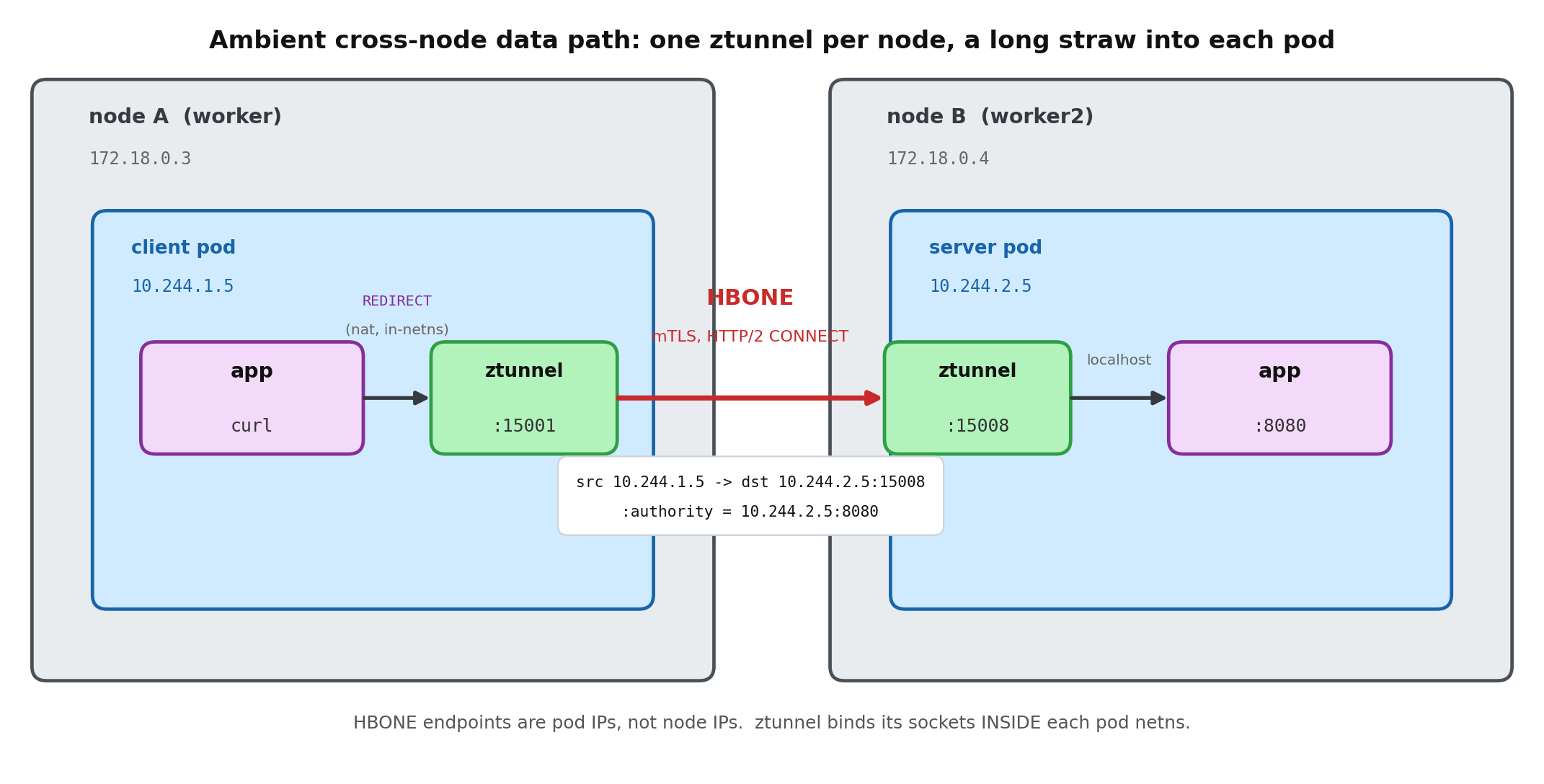
ASCII version of the data path (for RSS / no-JS readers)
   node A (worker)                                   node B (worker2)
 ┌───────────────────────────┐               ┌───────────────────────────┐
 │  client pod netns          │               │  server pod netns          │
 │  10.244.1.5                │               │  10.244.2.5                │
 │                            │               │                            │
 │  app --curl server:8080    │               │        app :8080           │
 │    │ REDIRECT (nat)        │               │           ▲ localhost      │
 │    ▼                       │               │           │                │
 │  ztunnel :15001 ───────────┼── HBONE ──────┼─► ztunnel :15008           │
 │  (long straw into pod)     │  mTLS, H2      │  (long straw into pod)     │
 │                            │  CONNECT       │                            │
 └───────────────────────────┘  :authority =  └───────────────────────────┘
   src = 10.244.1.5            10.244.2.5:8080   dst = 10.244.2.5:15008
                    (node IPs 172.18.0.x are not HBONE endpoints)
Recap
- One node proxy, many straws. ztunnel is one pod per node that
setnsinto each local pod and binds its capture sockets there. Not a sidecar, not a host router. - Pod identity end to end. In the pod-netns capture, the HBONE endpoints are pod IP to pod IP on
15008; the server app sees the client pod IP; both ends are pinned to SPIFFE identities. - Identity-scoped tunnels, multiplexed. The app port is not in the pool key: it rides inside the tunnel as the CONNECT authority for each application connection.
- A proxy, not a network overlay. HBONE carries TCP streams inside HTTP/2 + mTLS; ztunnel adds no ztunnel-owned VXLAN/Geneve device.
- TCP streams only in this path. Non-DNS UDP is not carried over HBONE here, so plan for UDP separately and allow TCP
15008in anyNetworkPolicy.
The through-line: ztunnel is a per-pod-scoped, identity-pinned, userspace TCP proxy. The kernel only steers packets to it; ztunnel does not become the pod’s address, and it does not install a VXLAN/Geneve-style network overlay.
Cheat sheet
| Port | Role |
|---|---|
| 15001 | outbound capture (app egress redirected here) |
| 15006 | inbound plaintext capture |
| 15008 | inbound HBONE (mTLS, HTTP/2 CONNECT) |
| 15053 | DNS (TCP + UDP, localhost) |
| 15021 / 15020 / 15000 | readiness / metrics / admin |
# The three commands that answer most "what is ztunnel doing" questions:
istioctl ztunnel-config workloads          # who is enrolled, and as what
nsenter -t <pod-pid> -n ss -lntp           # ztunnel's sockets, inside the pod netns
kubectl -n istio-system logs <ztunnel> | grep access   # src/dst identity + hbone_addr
Further reading
- Istio ambient docs, especially the ztunnel and traffic-redirection pages
- The HBONE and ztunnel design notes in the
istio/ztunnelrepository - RFC 9110 (the HTTP
CONNECTmethod), which HBONE uses to open a TCP tunnel; UDP proxying would be the separate CONNECT-UDP mechanism of RFC 9298, which this ztunnel app-traffic path does not use
Rebuild the cluster, rerun every block above, and watch the HBONE endpoints show up as pod IPs, not node IPs, from inside the pod netns. The model sticks once you have nsenter-ed into a pod and seen ztunnel’s sockets sitting inside it.

